How to Protect Your Identity in Photos Before Posting Online
Posting a photo online can reveal more about you than you intended.
Your face is the obvious one. But tattoos, people in the background, documents, reflections, locations and even information stored inside the photo file can potentially reveal identifying information.
If you want to post photos anonymously—or simply have more control over your privacy—it’s worth checking more than just your face before hitting publish.
Here’s what to look for before posting a photo online.
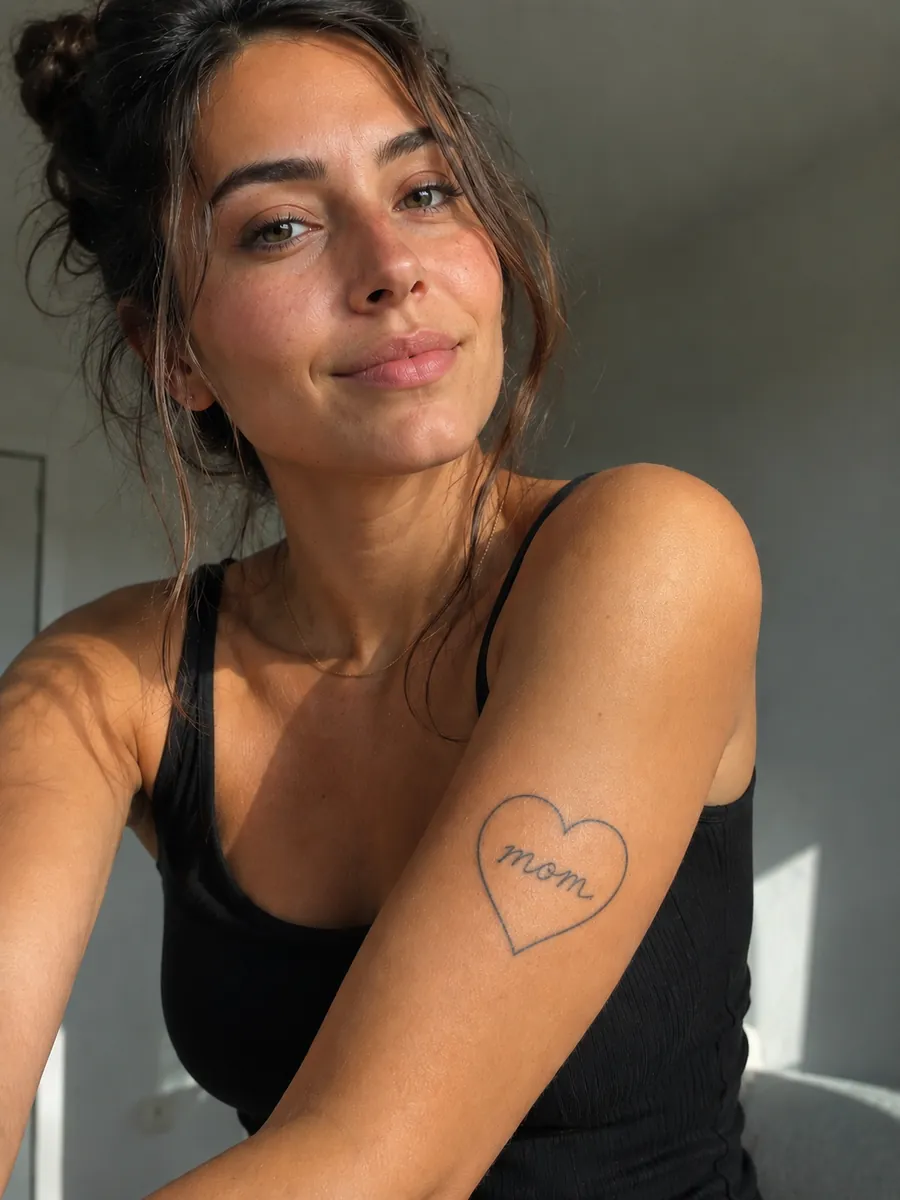
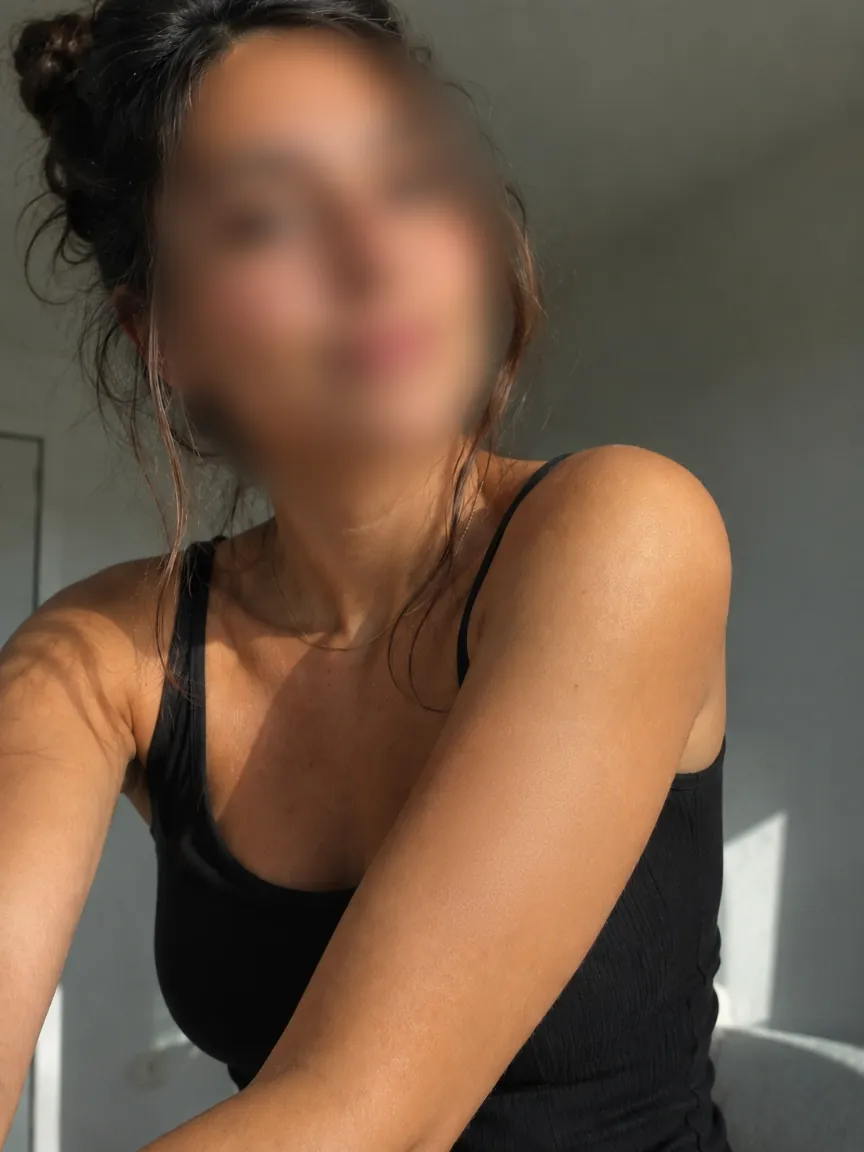
1. Blur Your Face
Your face is one of the most obvious identifying features in a photo.
If you don’t want your identity connected to an image, obscuring your face is a good place to start.
With Redact.ID, you can blur faces in three ways:
Auto Face Blur automatically detects faces in your photo so you can quickly obscure them.
Manual Blur lets you choose exactly what you want blurred.
Paint-On Blur lets you paint blur directly onto specific areas of your image when you need more precise control.
Automatic detection can save time, but always review the finished photo before posting. A face may appear somewhere you weren’t expecting, including in the background of an image.
2. Look for Other People’s Faces
Protecting your identity doesn’t necessarily mean you’re the only person who needs to be obscured.
Look at the entire image for recognizable faces.
Someone may be standing in the background, appearing on a television or computer screen, visible in a photograph on the wall, or caught in a reflection.
Redact.ID can automatically detect multiple faces within an image, and you can use manual or paint-on blur for anything you want to cover yourself.
3. Check for Identifying Tattoos, Scars and Moles
You can hide your face and still be recognizable.
Distinctive tattoos are an obvious example, especially if you’ve posted photos showing the same tattoos elsewhere online. But other unique physical features can also act as identifiers.
Visible scars, birthmarks, distinctive moles and other recognizable features may make it possible to connect one photo of you with another.
Before posting anonymously, look over any visible areas of your body and consider whether there’s something recognizable that you routinely show elsewhere online.
Redact.ID includes AI tattoo removal designed specifically to remove visible tattoos from photos. Manual and paint-on blur can also be used to obscure other identifying areas you don’t want visible.
4. Remove EXIF Metadata
Not everything a photo reveals is visible.
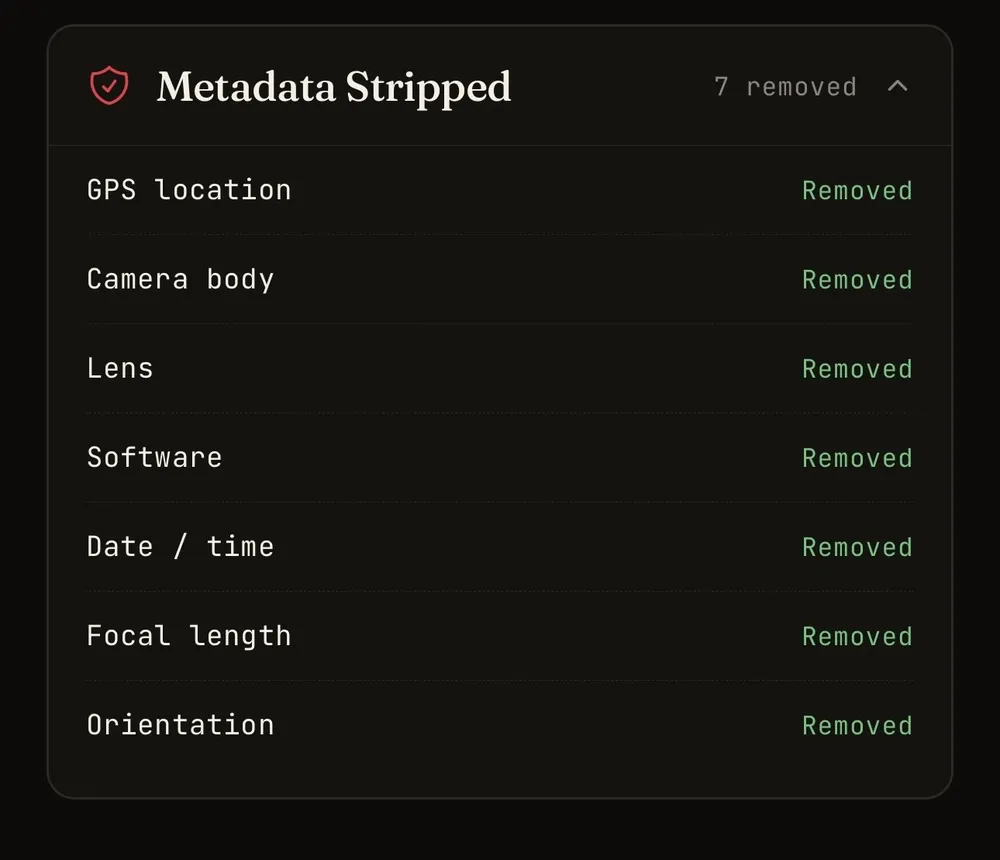
Digital images can contain EXIF metadata: information stored within the image file itself.
Depending on how a photo was created and processed, its metadata can contain information about the camera or device used, when the image was taken, technical camera settings and, in some circumstances, location information.
If privacy is important, removing unnecessary metadata gives you one less source of information to worry about before sharing an image.
Redact.ID includes EXIF metadata removal as part of its photo privacy tools.
Learn About Removing EXIF Data
5. Look at What’s Behind You
The background of a photo can reveal an enormous amount of context.
Before posting, look for things like:
- Street signs
- Building names
- House numbers
- Mail or packages
- Employee badges
- School or workplace logos
- Certificates and documents
- Vehicle licence plates
- Computer screens
- Calendars
- Event tickets
- Receipts
- Unique landmarks
You don’t necessarily have to remove the entire background.
If there’s one identifying detail you don’t want visible, Redact.ID’s manual and paint-on blur tools can help you obscure that specific area.
6. Check Mirrors, Windows and Reflections
Reflections are easy to miss.
A mirror may reveal your face even when it’s outside the main frame. A window can show the room behind you. Sunglasses, televisions, appliances and other reflective surfaces can capture unexpected details.
Zoom into the finished image and check reflective surfaces before posting.
If you find something you don’t want visible, blur it before publishing the photo.
7. Watch for Personal Information
Sometimes the biggest privacy risk isn’t your face at all.
Zoom in and check for readable information.
A piece of mail could show your name and address. A boarding pass could contain travel information. A work badge could identify your employer. A computer screen could show an email address or username.
If someone can zoom into your photo, assume they can potentially read whatever you’ve left visible.
8. Consider Whether Your Photos Can Be Connected
Posting anonymously isn’t just about what’s contained in a single image.
Think about whether something in the photo could connect it to images you’ve posted elsewhere.
This can include:
- The same bedroom or recognizable background
- Tattoos, scars, birthmarks or distinctive moles
- Jewellery you regularly wear
- A distinctive phone case or accessory
- Unusual or recognizable clothing
- Your hairstyle or hair colour
- A vehicle
- Frequently visited locations
Clothing is particularly easy to overlook. If you wear a distinctive jacket, pair of shoes or other recognizable item in anonymous photos and then post yourself wearing the same item while out in public on another account, those images may be easier to connect.
The same principle applies to physical features. A recognizable scar, mole or birthmark that appears repeatedly across different photos can potentially provide another point of comparison even when your face is hidden.
If keeping identities separate matters to you, look at the photo from that perspective before posting.
Ask yourself:
What in this image could connect it back to me?
9. Remember That Face Blurring Isn’t Complete Anonymity
Blurring your face can reduce one obvious identifier, but it doesn’t automatically make a photograph anonymous.
Your identity may still be revealed through tattoos, scars, distinctive physical features, clothing, surroundings, metadata, text, reflections or information you’ve published elsewhere.
There also isn’t a single editing tool that can guarantee anonymity once something is posted online.
The goal is to reduce unnecessary identifying information and make deliberate decisions about what you choose to share.
A Quick Privacy Checklist Before Posting
Before publishing a photo, check:
Face: Is my face visible?
Other people: Are there faces in the background?
Tattoos & physical features: Are tattoos, scars, moles, birthmarks or other distinctive features visible?
Clothing & accessories: Am I wearing something recognizable that I’ve shown on another account or while out in public?
Background: Does anything reveal where I live, work or spend time?
Text: Are names, addresses, emails or documents readable?
Reflections: Is anything revealing visible in mirrors or reflective surfaces?
Metadata: Does the image contain EXIF information I don’t want to share?
Connections: Could something in this photo connect an anonymous account to another identity?
Taking a few seconds to check these details can prevent you from sharing more than you intended.
Photo Privacy Without Complicated Editing
Redact.ID was built to make protecting identifying information in photos easier before they reach the internet.
Use Redact.ID to:
- Automatically detect and blur faces
- Manually blur identifying details
- Paint blur directly onto an image
- Remove identifying tattoos
- Remove EXIF metadata
- Process multiple photos more efficiently
Your photos and edits are stored locally on your device rather than being kept in a Redact.ID photo library on a server.
Features requiring additional processing, such as AI tattoo removal, send the image for GPU processing.
Protect Your Identity Before You Post
You don’t have to choose between sharing a photo and sharing every piece of information inside it.
Review your face. Check your tattoos and distinctive features. Look at your clothing and surroundings. Check the background. Remove unnecessary metadata. Blur the details you don’t want visible.
Then decide what you’re comfortable putting online.
Redact.ID helps you control what your photos reveal before you share them.