Remove EXIF Data From Photos
Remove hidden photo metadata before you share
A photo can contain information you can’t see just by looking at it.
EXIF metadata can store details about how and when an image was created and, depending on the image and device settings, may include location information.
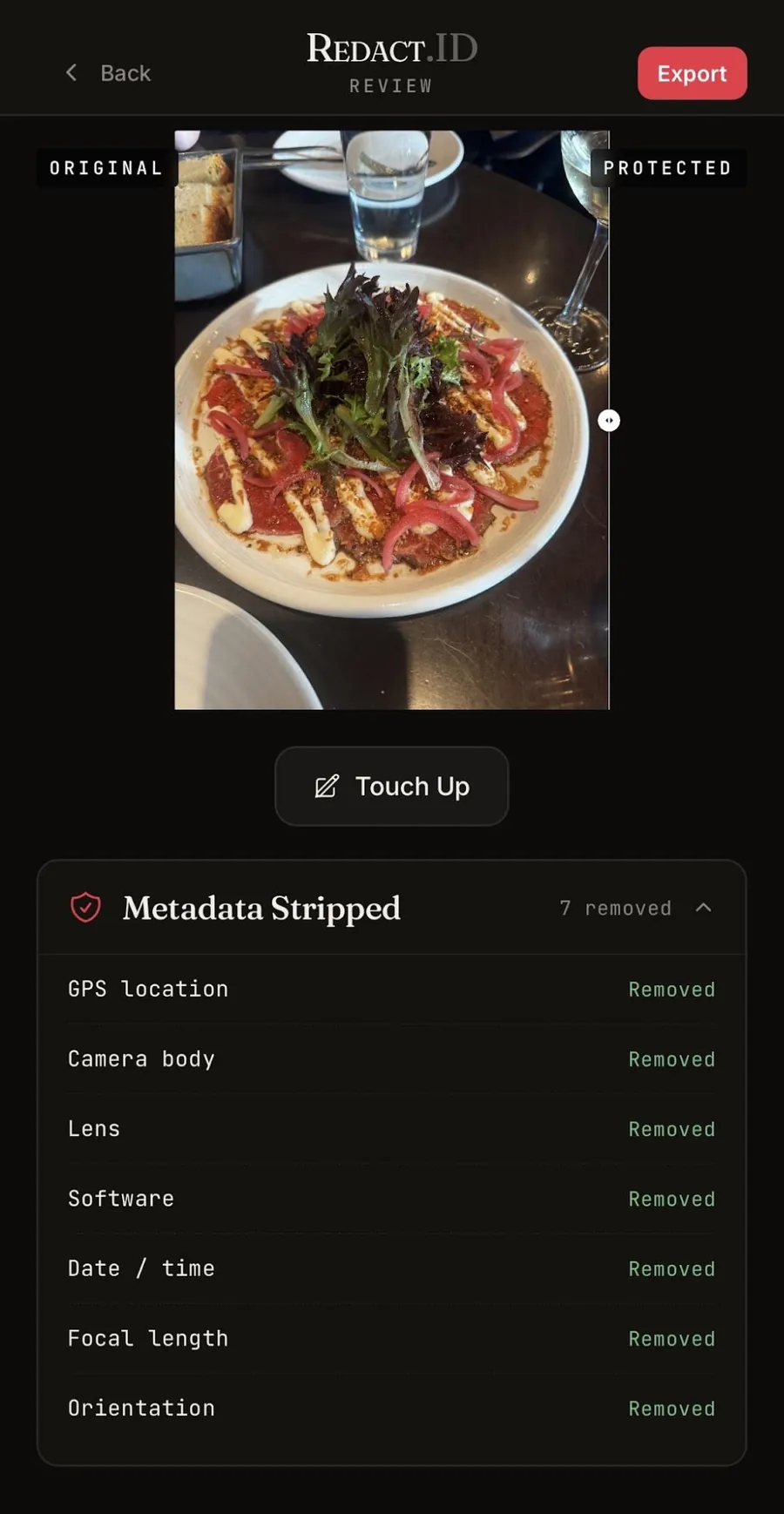
Redact.ID lets you remove EXIF data from your photos before you post, send or share them online.
Choose your photo. Remove its metadata. Export a clean copy.
What Is EXIF Data?
EXIF stands for Exchangeable Image File Format.
When you take a photo, your phone or camera may save additional information inside the image file. This information is known as metadata.
Depending on the device, settings and image, metadata may include details such as:
- Date and time the photo was taken
- Camera or phone manufacturer
- Device or camera model
- Camera settings
- Lens information
- Image dimensions
- Software used to process the image
- GPS coordinates or other location information
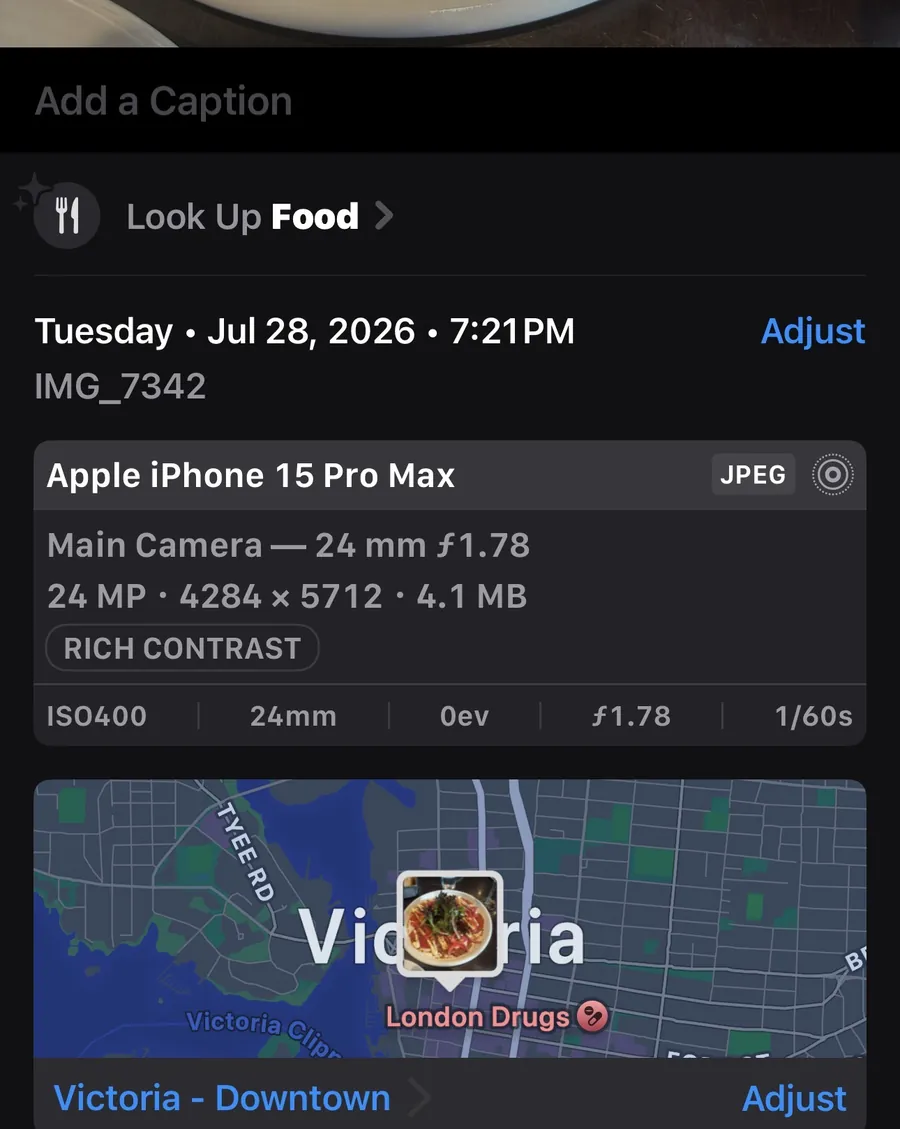
Not every photo contains all of this information, and many online platforms strip some metadata when images are uploaded.
But if you’re sharing the original image—or simply don’t know what information will remain attached—removing unnecessary metadata before sharing gives you more control over what leaves your device.
Why Remove Metadata From Photos?
Most people think about what’s visible when deciding whether a photo is safe to share.
Your face. Your surroundings. A street sign. A tattoo.
But some information can exist inside the image file itself.
If you’re trying to limit the information attached to a photo, checking its metadata should be part of the process.
Removing EXIF data can be useful when:
- Posting photos publicly
- Sharing images anonymously
- Sending original image files to someone you don’t know
- Uploading content to websites or online communities
- Keeping separate online identities
- Sharing photos taken at home or another private location
- Removing unnecessary device and camera information
Can Photos Contain Your Location?
They can.
Depending on your device and camera settings, a photo may contain GPS information recording where it was taken.
This does not mean every photo you post online automatically reveals your exact location. Whether location information exists and whether it remains available after uploading depends on the original image, your settings and how the receiving platform processes the file.
But if you’re trying to protect your location, it’s worth checking.
Removing EXIF metadata before sharing the file can remove that additional source of information.
How to Remove EXIF Data With Redact.ID
Redact.ID is designed to make removing photo metadata straightforward.
- Choose your photo.
- Export your edited image.
- Redact.ID automatically removes all EXIF data.
- Share the new version instead of the original.
Removing EXIF Data Is Only Part of Photo Privacy
Metadata isn’t the only information worth checking before you post.
Even a photo with its EXIF data removed can reveal your identity or location through what’s actually visible in the image.
Look for:
- Faces
- Tattoos
- Scars, moles or birthmarks
- Distinctive clothing or jewellery
- Street signs
- House numbers
- Licence plates
- Mail and packages
- Computer screens
- Documents
- Workplace or school information
- Mirrors and reflections
- Recognizable landmarks
If you’re trying to share a photo anonymously, removing metadata should be one step in a larger privacy check.
Read: How to Protect Your Identity in Photos Before Posting
More Than an EXIF Remover
Redact.ID was built around photo privacy rather than general photo editing.
Alongside EXIF metadata removal, Redact.ID gives you tools for reducing visible identifying information in your photos.
Auto Face Blur
Automatically detect faces in an image so you can quickly obscure them before sharing.
Manual and Paint-On Blur
Choose exactly what you want hidden or paint blur directly over identifying details.
AI Tattoo Removal
Remove distinctive tattoos from photos instead of simply covering them with blur.
Together, these tools help you check both sides of photo privacy: the information people can see and the information contained within the file itself.
Built With Privacy in Mind
Using a privacy tool shouldn’t require creating another permanent online collection of the photos you’re trying to protect.
Redact.ID stores your photos and edits locally on your device rather than maintaining your photos in a Redact.ID server-side photo library.
Features requiring additional processing, such as AI tattoo removal, send the image for GPU processing.
For everyday privacy edits like removing identifying information from a photo, Redact.ID is designed to give you greater control over what you ultimately share.
Frequently Asked Questions
What is EXIF data?
EXIF is metadata that can be stored within an image file. Depending on the photo and device, it can contain information such as when the photo was taken, the device or camera used, camera settings and potentially GPS location data.
How do I remove EXIF data from a photo?
Redact.ID includes an EXIF metadata removal tool that lets you remove metadata before exporting and sharing your image.
Can EXIF data reveal where a photo was taken?
Potentially. Some images can contain GPS coordinates if location information was recorded when the photo was created.
Whether GPS data is present depends on factors including your device and settings.
Do all photos contain EXIF data?
No. The metadata available varies depending on how an image was created, edited, exported or processed.
Do social media apps remove EXIF data?
Some platforms remove some or all metadata during image processing, but behavior varies between platforms and can change over time.
If removing metadata matters to you, removing it from your own copy before sharing means you aren’t relying on a third party to do it for you.
Does removing EXIF data change how my photo looks?
Removing metadata is different from visually editing the contents of an image. EXIF information exists as data associated with the image file rather than as something visibly displayed within the photograph.
Does removing EXIF data make a photo anonymous?
No.
Removing metadata eliminates one potential source of information, but the image itself may still contain identifying details.
Your face, tattoos, distinctive physical features, clothing, surroundings, reflections, text and other visible information may still reveal who or where you are.
What else should I remove before posting a photo anonymously?
Check the entire image for faces, tattoos, scars, distinctive clothing, recognizable backgrounds, documents, addresses, licence plates, reflections and other details that could identify you.
Redact.ID combines EXIF removal with automatic face blur, manual blur, paint-on blur and AI tattoo removal to help with that process.
Remove What’s Hidden Before You Share
You already check what people can see in your photos.
It’s worth checking what the file itself may reveal, too.
Remove unnecessary EXIF metadata, check your photo for identifying details and decide exactly what you want to share.
Redact.ID helps you control what information leaves your device with your photos.